Airshot · screenshots
Capture it, mark it up, hide the secrets.
Airshot is a fast screenshot tool for Windows and Mac: area, window, full screen and scrolling captures, arrows, boxes, numbered steps, blur and spotlight, pinned images that float above your work — and one click that covers API keys, passwords, e-mail addresses, phone and card numbers before you share. Text in any capture is searchable. Offline, no account, no subscription.
영역·창·전체·스크롤 캡처, 화살표·번호·가리기·고정, 키·비밀번호·이메일을 한 번에 가리고 캡처 속 글자로 찾습니다. 오프라인, 계정·구독 없음.
Windows 10 or later, 64-bit. Portable: unzip and run airshot.exe, no installer; it lives in the tray (PrtSc captures an area). Mac version coming to the Mac App Store.
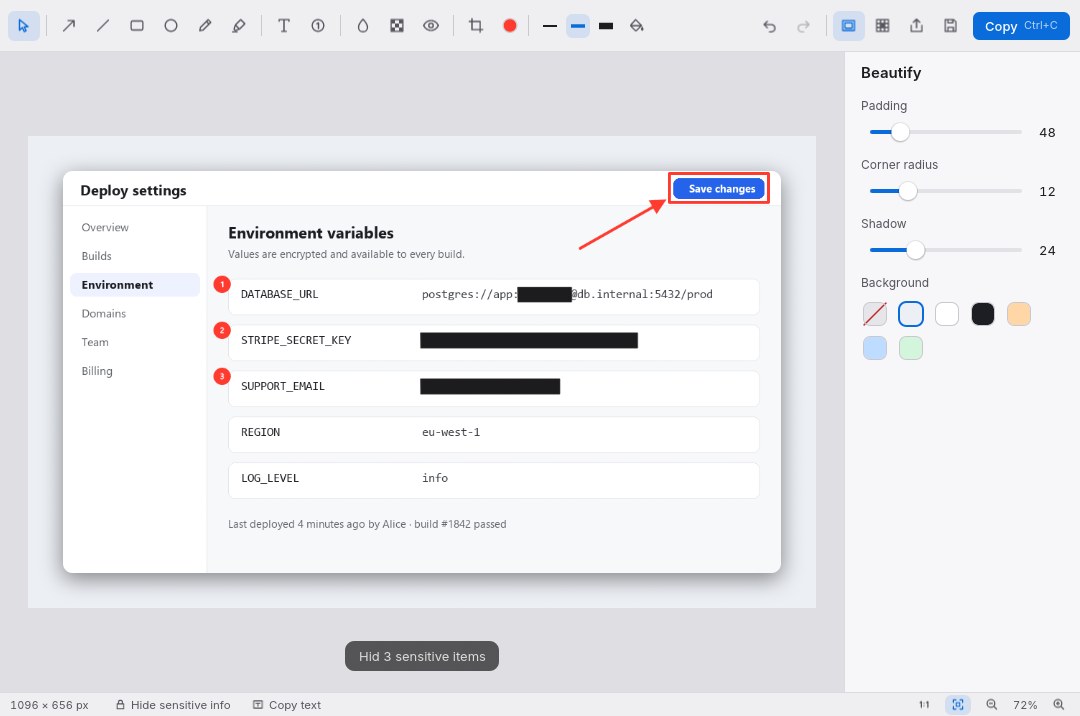
Every kind of capture
Area with a pixel magnifier, window, full screen, the previous area, a timer for menus, and scrolling capture of long pages.
Hide sensitive info
Keys, tokens, passwords, e-mail, phone, card and ID numbers found on screen and covered with solid boxes — on your computer, by the system’s own text recognition.
Mark up in seconds
Arrows, lines, boxes, pen, highlighter, text, numbered steps, blur, pixelate, spotlight, crop and a one-click background for sharing.
Find it again
A library of every capture you can search by the text inside it, reopen with its markup still editable, or pin on screen.
Full version
- Everything is free for 7 days. After that every feature keeps working, but copied and saved images carry a small “Airshot · trial” mark.
- Buy once. Your licence key works on your own computers, now and for future versions.
- Refund within 14 days, no questions asked.
7일 무료 체험 후에도 모든 기능을 쓸 수 있고, 복사·저장한 이미지에 작은 표시만 들어갑니다. $4.99 한 번 결제, 14일 이내 환불.
Checkout by Paddle, our reseller (merchant of record). Cards, PayPal, Apple Pay and Google Pay.
Thank you! Your licence key — keep it somewhere safe:
In Airshot open Settings › Full version, paste the key and press Activate.
Questions
- Does anything leave my computer?
- No. Captures, the text read from them and your library stay on your computer. Only buying the full version talks to a server (Paddle, then our licence service).
- Print Screen opens the Snipping Tool.
- Windows 11 gives the PrtSc key to the Snipping Tool. Airshot’s Settings shows this and switches it over in one click (you may need to sign out once), or pick any other shortcut.
- Does “Hide sensitive info” catch everything?
- It finds the common formats (API keys and tokens, “password:” values, passwords in URLs, e-mail, phone, card, ID and IP numbers) and you can add or remove boxes by hand. Always look before you share.
- I lost my key.
- Open this page with your order ID:
doublehash.app/airshot?txn=txn_…(in Paddle’s receipt email), or write to support@doublehash.app. - Refunds
- Within 14 days of purchase, for any reason: use the link in Paddle’s receipt email or write to support@doublehash.app.
- Windows says “Windows protected your PC”.
- Airshot is new and not yet code-signed. Click More info › Run anyway.
- Feedback
- Bugs and ideas go to airshot.telloo.io/feedback — post, vote and comment without an account.