Airpane · iPhone screen on a Windows PC
Your iPhone, on the big screen.
Airpane shows your iPhone’s screen live in a window on your Windows PC — for meetings and classes, demos, games and photos. Type a 4-digit code once, then one tap. It stays on your Wi-Fi: no account, no cloud, no subscription. Take screenshots and record MP4 right from the window.
아이폰 화면을 같은 Wi-Fi 의 Windows PC 창에 실시간으로 띄웁니다. 코드 4자리를 한 번 넣으면 다음부터는 한 번에. 스크린샷·MP4 녹화. 계정·클라우드·구독 없음.
Windows 10 or later, 64-bit. Portable: unzip and run airpane.exe, no installer. The iPhone app is free.
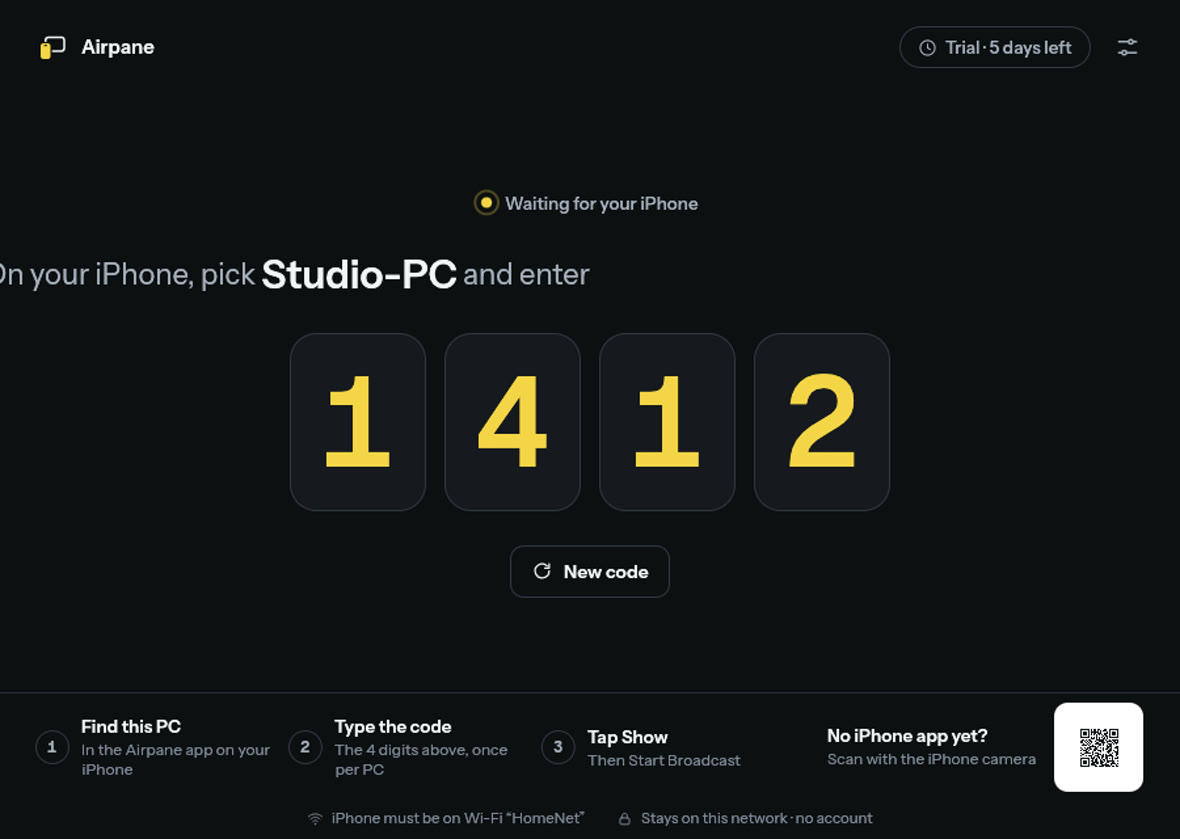
Code once, then one tap
Pick the PC in the iPhone app and type the code shown on the PC. Next time it’s just Show.
Made to be presented
While showing, the window is only your screen on black. The controls appear when you move the mouse; F11 for full screen.
Screenshots and recordings
A full-size PNG, or an MP4 of the phone’s own video stream — no re-encoding, so it stays sharp.
Stays on your network
The phone sends straight to the PC over Wi-Fi. Nothing goes through our servers; there is no account.
The iPhone app
Airpane for iPhone is free and coming to the App Store. Open it on the same Wi-Fi as the PC, pick the PC, type its code, then tap Show and Start Broadcast. To stop, tap the red bar at the top of the iPhone’s screen.
아이폰 앱은 무료이며 곧 App Store 에 나옵니다. PC 와 같은 Wi-Fi 에서 PC 를 고르고 코드를 넣은 뒤 보여 주기 → 방송 시작.
Full version
- Everything works for 7 days. After that the PC still finds your iPhone and checks its code, but showing the screen needs the full version.
- Buy once. Your licence key works on your own computers, now and for future versions.
- Refund within 14 days, no questions asked.
7일 동안 모든 기능 무료. 그 뒤 화면 보여 주기만 정식 버전이 필요합니다. $4.99 한 번 결제, 14일 이내 환불. 아이폰 앱은 늘 무료.
Checkout by Paddle, our reseller (merchant of record). Cards, PayPal, Apple Pay and Google Pay.
Thank you! Your licence key — keep it somewhere safe:
In Airpane on the PC open Settings › Licence (or the dialog after the trial), paste the key and press Activate.
Questions
- What do I need?
- A Windows 10 or 11 PC and an iPhone (iOS 16 or later) on the same Wi-Fi network. Guest networks that keep devices apart won’t work.
- The iPhone doesn’t find the PC.
- Keep Airpane open on the PC, put both on the same Wi-Fi, and if Windows asked about network access choose Allow — Airpane’s window shows a “Fix network access” button when Windows Firewall blocks it. On the iPhone, Local Network must be on for Airpane (Settings › Privacy & Security).
- Is sound sent too?
- Not yet: Airpane shows the screen only.
- Is it AirPlay?
- No. Airpane uses the iPhone’s own screen broadcast and its own connection to the PC; nothing passes through Apple’s or our servers.
- I lost my key.
- Open this page with your order ID:
doublehash.app/airpane?txn=txn_…(in Paddle’s receipt email), or write to support@doublehash.app. - Refunds
- Within 14 days of purchase, for any reason: use the link in Paddle’s receipt email or write to support@doublehash.app.
- Windows says “Windows protected your PC”.
- Airpane is new and not yet code-signed. Click More info › Run anyway.